Best Smart Plugs for Home Automation 2026
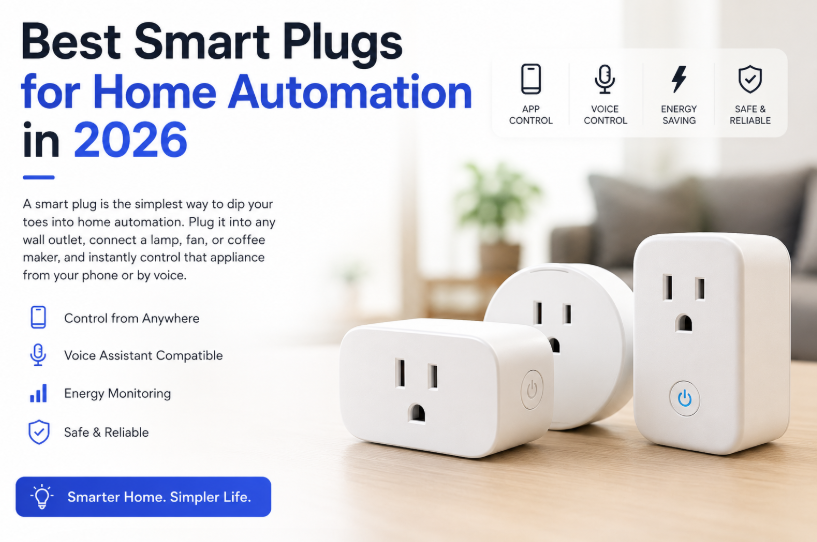
Best Smart Plugs for Home Automation in 2026
Smart plugs are one of the easiest and most affordable ways to start building a smart home. Within minutes, you can control lamps, coffee makers, fans, holiday lights, and other everyday appliances from your smartphone or with simple voice commands.
The latest smart plugs are more reliable than ever, with many supporting Alexa, Google Assistant, Apple Home, and Samsung SmartThings. Some models even track electricity usage, helping you reduce your energy bill.
After comparing features, ease of use, reliability, and overall value, here are the best smart plugs you can buy in 2026.
Quick Picks
-
Best Overall: TP-Link Kasa Smart Plug Mini (EP25)
-
Best for Alexa Users: Amazon Smart Plug
-
Best Future-Proof Choice: Wemo Smart Plug with Thread
-
Best Budget Pick with Energy Monitoring: Emporia Smart Plug
-
Best Outdoor Smart Plug: Kasa Outdoor Smart Plug (KP400)
Comparison Table
| Product | Connectivity | Energy Monitoring | Voice Assistants | Max Load | Approx. Price |
|---|---|---|---|---|---|
| TP-Link Kasa Smart Plug Mini (EP25) | Wi-Fi | No | Alexa, Google Assistant, SmartThings | 15A | ~$19 |
| Amazon Smart Plug | Wi-Fi | No | Alexa | 15A | ~$24 |
| Wemo Smart Plug with Thread | Thread + Wi-Fi | No | Alexa, Google Assistant, Apple Home | 15A | ~$29 |
| Emporia Smart Plug | Wi-Fi | Yes | Alexa, Google Assistant | 15A | ~$14 |
| Kasa Outdoor Smart Plug (KP400) | Wi-Fi | No | Alexa, Google Assistant | 15A (Dual Outlet) | ~$22 |
Detailed Reviews
1. TP-Link Kasa Smart Plug Mini (EP25) – Best Overall
For most people, the TP-Link Kasa Smart Plug Mini offers the perfect balance of price, reliability, and features. Installation is quick—you simply plug it in, connect it through the Kasa app, and you're ready to automate your home in just a few minutes.
The compact design is another big advantage. Unlike many bulky smart plugs, it leaves the neighboring wall outlet free, making it much more practical for everyday use.
It also supports scheduling, countdown timers, and an "Away Mode" that automatically turns devices on and off while you're away, helping make your home appear occupied.
Pros
-
Affordable price
-
Fast and reliable performance
-
Works with Alexa, Google Assistant, and SmartThings
-
Compact design that doesn't block adjacent outlets
-
No smart hub required
Cons
-
Supports only 2.4GHz Wi-Fi networks
2. Amazon Smart Plug – Best for Alexa Homes
If you already own Echo speakers or use Alexa throughout your home, Amazon's Smart Plug is the easiest option available.
Setup couldn't be simpler. Plug it in, open the Alexa app—or simply say, "Alexa, discover devices." Within moments, it's ready to use without installing additional apps or skills.
Its slim design also fits nicely into most wall outlets without taking up unnecessary space.
Pros
-
Extremely easy Alexa setup
-
Reliable integration with Echo devices
-
Compact design
-
Great for Alexa routines
Cons
-
Works exclusively with Alexa
-
Slightly more expensive than similar alternatives
3. Wemo Smart Plug with Thread – Best for Future-Proof Smart Homes
The Wemo Smart Plug is designed with tomorrow's smart homes in mind. It supports both Thread and Matter, two technologies becoming the new standard for smart home devices.
If you already use Apple Home with a HomePod or Apple TV, this plug integrates beautifully while also remaining compatible with Alexa and Google Assistant.
Its responsiveness is excellent, with commands executed almost instantly.
Pros
-
Thread and Matter support
-
Excellent Apple Home compatibility
-
Fast response times
-
Strong long-term compatibility
Cons
-
More expensive than most competitors
-
Requires a Thread border router to enjoy all Thread benefits
4. Emporia Smart Plug – Best Budget Option with Energy Monitoring
The Emporia Smart Plug proves you don't have to spend much to get premium features.
Its biggest advantage is real-time energy monitoring. Through the Emporia app, you can see exactly how much electricity your appliances consume and even estimate monthly operating costs by entering your local electricity rate.
It's especially useful for monitoring devices like space heaters, dehumidifiers, air purifiers, and gaming PCs.
Pros
-
Excellent value for money
-
Real-time energy tracking
-
Compact design
-
Monthly electricity cost estimates
Cons
-
Mobile app can feel slightly cluttered
5. Kasa Outdoor Smart Plug (KP400) – Best for Outdoor Automation
Need to automate outdoor lighting or holiday decorations? The Kasa Outdoor Smart Plug is built specifically for that purpose.
With its IP64 weather-resistant rating, it can handle rain, snow, and harsh outdoor conditions. The two outlets operate independently, allowing you to schedule or control different devices separately.
It's an ideal choice for patio lighting, fountains, garden pumps, and seasonal decorations.
Pros
-
Weather-resistant construction
-
Two independently controlled outlets
-
Reliable Wi-Fi connectivity
-
Great scheduling features
Cons
-
Larger than indoor smart plugs
-
Doesn't include energy monitoring
What Should You Look for Before Buying?
Choosing a smart plug isn't just about price. Here are a few important factors to consider before making your decision.
Voice Assistant Compatibility
If your household is built around Alexa, the Amazon Smart Plug provides the smoothest experience. However, if you use multiple ecosystems—or may switch in the future—the TP-Link Kasa or Wemo models offer much greater flexibility.
Energy Monitoring
Not every smart plug can measure electricity usage. If tracking energy costs matters to you, spending a few extra dollars on a model like the Emporia Smart Plug can pay off over time.
Size and Outlet Design
Some smart plugs are bulky enough to block the second socket in a standard wall outlet. Compact models like the Kasa Mini and Amazon Smart Plug avoid this issue.
Future Compatibility
Matter and Thread are quickly becoming the future of smart home technology. If you're planning to expand your smart home over the next several years, investing in a Matter-compatible device such as the Wemo Smart Plug makes good sense.
Our Final Verdict
For most homeowners, the TP-Link Kasa Smart Plug Mini (EP25) remains the clear winner. It combines dependable performance, broad compatibility, an easy setup process, and an affordable price, making it an excellent choice for beginners and experienced smart home users alike.
If your entire smart home revolves around Alexa, the Amazon Smart Plug offers the simplest experience. Budget-conscious buyers who want to monitor electricity usage should strongly consider the Emporia Smart Plug, while those building a Matter-ready home will appreciate the Wemo Smart Plug with Thread.
Frequently Asked Questions
Do smart plugs require a hub?
No. All of the smart plugs recommended here connect directly to your Wi-Fi network. The only exception is that Wemo's Thread features perform best when paired with a compatible Thread border router.
Can I control several smart plugs at once?
Absolutely. Most smart home apps allow you to group devices together or create routines, letting you turn multiple plugs on or off with a single tap or voice command.
Are smart plugs safe for high-power appliances?
Most quality smart plugs are rated for 15 amps (up to 1,800 watts), making them suitable for lamps, fans, coffee makers, TVs, and similar appliances. However, avoid running devices that draw power continuously near the maximum rating—such as large portable heaters—unless the manufacturer specifically states that the plug is designed for those loads. Always follow the product's safety guidelines.

developeradmin
GearInspector contributor. Passionate about helping you make smarter buys.
Related Articles
Best Smart Light Bulbs Compared – 2026 Buying Guide
Jul 15, 2026