Website vs Web App: What Is the Difference? (Complete Guide 2026)
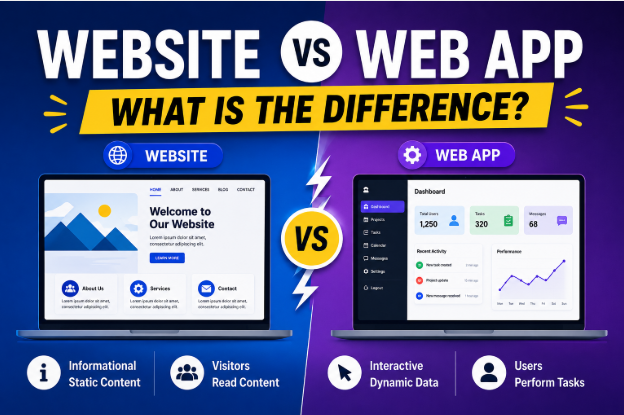
Website vs Web App: What Is the Difference?
If you've ever researched building an online presence for your business, you've probably come across the terms website and web app. While they may seem similar because both are accessed through a web browser, they serve very different purposes.
Understanding the difference between a website and a web application is important before investing time and money into your digital project. Choosing the wrong option can lead to unnecessary costs, limited functionality, or a poor user experience.
In this comprehensive guide, you'll learn what websites and web apps are, how they differ, their advantages and disadvantages, real-world examples, and which one is the right choice for your business in 2026.
What Is a Website?
A website is a collection of web pages designed primarily to provide information to visitors. Users can browse content, read articles, view products or services, and learn about a company or organization.
Most websites are informational, although they may include interactive features such as contact forms, comment sections, or search functionality.
Examples of websites include:
- Business websites
- Personal blogs
- News websites
- Portfolio websites
- Educational websites
- Restaurant websites
- Corporate websites
The primary goal of a website is to inform, educate, promote, or market.
Common Features of a Website
A typical website may include:
- Home page
- About page
- Services page
- Product pages
- Blog
- Contact page
- Image galleries
- FAQs
- Search functionality
Most visitors consume information rather than perform complex tasks.
What Is a Web App?
A web application (web app) is an interactive software program that runs inside a web browser. Unlike a traditional website, users actively interact with a web app to complete specific tasks.
Instead of simply reading content, users can:
- Create accounts
- Log in securely
- Store personal information
- Edit data
- Upload files
- Send messages
- Make payments
- Collaborate with others
A web app behaves much like traditional desktop or mobile software but doesn't require installation.
Examples of Web Apps
Many popular online services are web applications.
Examples include:
- Email platforms
- Online banking systems
- Project management tools
- Customer relationship management (CRM) platforms
- Online learning portals
- Cloud storage services
- Video conferencing platforms
- Online design tools
- Accounting software
These platforms rely heavily on user interaction and dynamic content.
Website vs Web App: Quick Comparison
| Feature | Website | Web App |
|---|---|---|
| Primary Purpose | Share information | Perform tasks |
| User Interaction | Limited | Extensive |
| Login Required | Usually no | Usually yes |
| Database Usage | Minimal | Extensive |
| Personalization | Limited | Highly personalized |
| Development Complexity | Lower | Higher |
| Maintenance | Easier | More complex |
| Cost | Lower | Higher |
| Performance Requirements | Moderate | High |
| Security Requirements | Standard | Advanced |
How Websites Work
Websites generally display content that is the same for every visitor.
For example:
A bakery website may display:
- Menu
- Business hours
- Contact information
- Photos
- Customer reviews
Every visitor sees nearly the same content.
Updates are usually made by the website owner.
How Web Apps Work
Web applications generate personalized content.
For example:
An online banking web app shows:
- Account balance
- Transaction history
- Personal information
- Payment options
- Loan details
Every user sees different information after logging in.
User Interaction
This is perhaps the biggest difference.
Website
Users mostly:
- Read
- Browse
- Watch
- Learn
Interaction is limited.
Web App
Users actively:
- Create
- Edit
- Save
- Upload
- Download
- Purchase
- Manage information
Interaction is central to the experience.
Authentication
Most websites allow visitors to browse freely.
Examples:
- Company websites
- Blogs
- News websites
Web apps almost always require:
- Login
- Password
- User profiles
- Authentication
This protects personal data.
Data Storage
Websites usually store:
- Articles
- Images
- Videos
- Static pages
Web apps constantly process and store user-generated data such as:
- Messages
- Documents
- Orders
- Payments
- Customer records
- Preferences
Development Complexity
Creating a website is generally much simpler.
A typical website may use:
- HTML
- CSS
- JavaScript
- WordPress
- Website builders
Web apps require additional technologies such as:
- Backend programming
- Databases
- APIs
- Authentication systems
- Cloud infrastructure
- Real-time communication
This makes web apps more complex to build and maintain.
Performance Requirements
Web apps often perform many operations simultaneously.
For example:
A project management platform may:
- Update tasks in real time
- Notify team members instantly
- Sync files across devices
- Save edits automatically
These features require powerful servers and optimized code.
Websites usually demand fewer computing resources.
Security Differences
Security is important for both, but web apps require much stronger protection because they handle sensitive user data.
Important security measures for web apps include:
- HTTPS encryption
- Secure authentication
- Multi-factor authentication
- Data encryption
- Session management
- Access controls
- Regular security testing
Business websites should also follow good security practices, but the level of protection required is generally lower.
SEO Differences
Websites are typically built with search engine optimization (SEO) in mind.
Their pages can rank in search engines for keywords related to products, services, or educational content.
Web apps often focus more on functionality than discoverability. Some sections of a web app may not even be indexed by search engines because they require users to log in.
Many businesses use both:
- A public website for SEO and marketing.
- A private web app for registered users.
Advantages of a Website
A website offers several benefits:
- Lower development cost
- Faster launch
- Easier maintenance
- Better SEO opportunities
- Excellent for branding
- Ideal for content marketing
- Easier to manage
For many small businesses, a website is the perfect starting point.
Advantages of a Web App
Web apps provide advanced functionality, including:
- Personalized user experiences
- Data management
- Automation
- Collaboration
- Online transactions
- Scalable business operations
- Integration with third-party services
They are ideal for businesses that rely on user interaction and recurring engagement.
Disadvantages of a Website
Some limitations include:
- Limited user interaction
- Basic functionality
- Less personalization
- Fewer automation features
As businesses grow, they may eventually require a web app.
Disadvantages of a Web App
Web apps also have challenges:
- Higher development costs
- Longer development time
- Greater maintenance needs
- More complex security requirements
- Ongoing software updates
Businesses should plan for these ongoing investments.
Which Businesses Need a Website?
A website is often the best choice for:
- Local businesses
- Restaurants
- Freelancers
- Consultants
- Law firms
- Medical clinics
- Bloggers
- Photographers
- Non-profit organizations
- Corporate companies
If your primary goal is to share information, generate leads, or build credibility, a website is usually sufficient.
Which Businesses Need a Web App?
A web app is better suited for:
- SaaS companies
- Online banking platforms
- Educational portals
- Membership websites
- Online marketplaces
- Booking systems
- Customer dashboards
- Project management software
- CRM systems
- Cloud-based software
If users need to perform tasks, save data, or interact extensively with your platform, a web app is likely the better solution.
Can a Website Become a Web App?
Yes.
Many successful businesses start with a simple website and later expand into a web app as their needs evolve.
For example:
- Launch a business website.
- Publish helpful content and attract visitors.
- Build an audience.
- Introduce user accounts.
- Add customer dashboards.
- Expand into a fully featured web application.
This gradual approach reduces risk and allows your platform to grow alongside your business.
Website vs Web App: Which One Should You Choose?
The right choice depends on your goals.
Choose a website if you want to:
- Promote your business
- Build brand awareness
- Publish articles
- Showcase products or services
- Improve search engine visibility
- Generate leads
Choose a web app if you need users to:
- Log in
- Manage accounts
- Save data
- Complete transactions
- Collaborate
- Use advanced online tools
Some businesses benefit from having both—a public-facing website for marketing and a secure web app for customer functionality.
Future Trends in 2026
The line between websites and web apps continues to blur.
Modern websites increasingly include interactive elements, while web apps are becoming more user-friendly and SEO-conscious.
Key trends include:
- AI-powered personalization
- Progressive Web Apps (PWAs)
- Faster cloud infrastructure
- Voice-enabled interfaces
- Enhanced cybersecurity
- Low-code and no-code development
- Real-time collaboration features
Businesses that embrace these technologies can create more engaging digital experiences for their users.
Frequently Asked Questions (FAQs)
Is a web app the same as a website?
No. A website mainly provides information, while a web app allows users to perform interactive tasks such as managing accounts, editing data, or completing transactions.
Can a website include interactive features?
Yes. Modern websites often include contact forms, search bars, chat widgets, and other interactive elements. However, if interaction becomes the primary purpose of the platform, it starts to resemble a web app.
Which is more expensive to build?
A web app is generally more expensive because it requires backend development, databases, user authentication, security measures, and ongoing maintenance.
Which is better for SEO?
Websites are usually better suited for SEO because their content is publicly accessible and designed to rank in search engines. Many web app features are hidden behind login screens and are not indexed.
Can my business have both?
Absolutely. Many businesses use a marketing website to attract visitors and a web app to provide services, customer dashboards, or subscription-based tools.
Final Thoughts
Although the terms website and web app are sometimes used interchangeably, they serve different purposes. A website is designed to share information, build credibility, and attract visitors, while a web app focuses on interaction, functionality, and helping users accomplish specific tasks.
For most small businesses and startups, beginning with a professional website is a practical first step. As your audience grows and your business requires more advanced features—such as user accounts, dashboards, or online collaboration—you can expand into a web application.
By understanding the strengths of each option and aligning them with your business goals, you can make informed decisions that support long-term growth and deliver a better experience for your users.

developeradmin
GearInspector contributor. Passionate about helping you make smarter buys.