Business Automation Software: What Can You Automate Today? | 2026 Guide
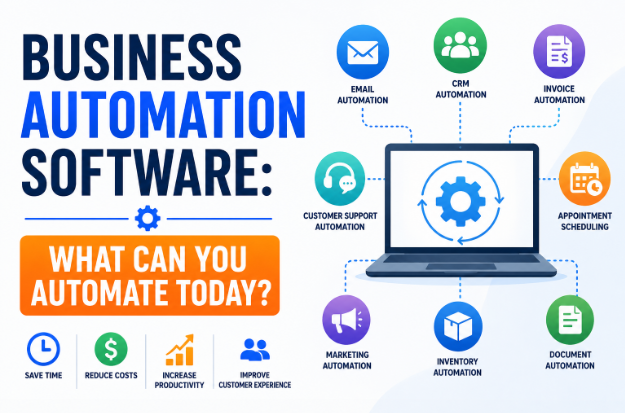
Business Automation Software: What Can You Automate Today?
Imagine running your business without spending hours sending invoices, replying to routine emails, updating spreadsheets, scheduling appointments, or manually entering customer data. Instead, these repetitive tasks happen automatically while you focus on growing your business.
That's exactly what business automation software is designed to do.
In 2026, automation is no longer a luxury reserved for large enterprises. Thanks to affordable cloud-based software and AI-powered tools, even freelancers, startups, and small businesses can automate everyday workflows without hiring additional staff or writing complex code.
Whether you operate an online store, digital agency, consulting business, or local company, automation can help you save time, reduce errors, improve customer experiences, and increase profitability.
In this guide, you'll learn what business automation software is, what tasks you can automate today, its benefits, popular automation categories, best practices, and how to successfully implement automation in your business.
What Is Business Automation Software?
Business automation software refers to digital tools that perform repetitive tasks and business processes with minimal or no human intervention.
Instead of completing the same task manually every day, automation software follows predefined rules or AI-powered workflows to complete it automatically.
Examples include:
- Automatically sending invoices
- Scheduling social media posts
- Responding to customer inquiries
- Backing up files
- Sending appointment reminders
- Updating customer records
- Creating reports
- Processing online orders
Automation reduces manual work while improving consistency and efficiency.
Why Business Automation Matters
Every business has repetitive tasks that consume valuable time.
Examples include:
- Entering customer information
- Sending follow-up emails
- Updating spreadsheets
- Tracking inventory
- Managing payroll
- Organizing documents
- Scheduling meetings
While each task may only take a few minutes, together they can consume dozens of hours every month.
Automation allows businesses to spend less time on routine work and more time on innovation, customer service, and growth.
Benefits of Business Automation Software
Businesses that adopt automation often experience significant improvements across their operations.
Save Time
Automation completes repetitive tasks in seconds instead of hours.
Employees can focus on higher-value work rather than administrative duties.
Reduce Human Errors
Manual data entry often leads to mistakes.
Automation follows predefined rules consistently, reducing costly errors.
Lower Operating Costs
Businesses can accomplish more without increasing headcount.
Automation also reduces paperwork and unnecessary administrative expenses.
Increase Productivity
Employees become more productive because they're no longer interrupted by repetitive tasks.
Improve Customer Experience
Customers receive faster responses, quicker order confirmations, timely updates, and more consistent service.
Better Decision-Making
Automation software often includes dashboards and analytics that provide real-time insights into business performance.
What Can You Automate Today?
The good news is that many everyday business tasks can be automated immediately.
Let's explore the most common areas.
Email Automation
Email is one of the easiest business processes to automate.
Examples include:
- Welcome emails
- Order confirmations
- Appointment reminders
- Follow-up emails
- Newsletter campaigns
- Payment reminders
- Customer surveys
Automated emails ensure consistent communication while saving valuable time.
Customer Relationship Management (CRM)
CRM automation helps businesses manage customer interactions more effectively.
Tasks that can be automated include:
- Lead assignment
- Contact updates
- Sales follow-ups
- Customer segmentation
- Deal tracking
- Meeting reminders
Sales teams spend less time updating records and more time building relationships.
Accounting and Finance
Accounting software can automate many financial tasks.
Examples include:
- Invoice creation
- Expense tracking
- Payment reminders
- Bank reconciliation
- Financial reporting
- Tax calculations
- Payroll processing
Automation improves accuracy and reduces administrative workload.
Marketing Automation
Marketing involves many repetitive activities.
Automation software can handle:
- Email campaigns
- Social media scheduling
- Lead nurturing
- Customer segmentation
- Campaign reporting
- Landing page forms
- Customer journeys
This helps businesses reach customers consistently without constant manual effort.
Customer Support
Customer service has been transformed by automation.
Businesses can automate:
- Frequently asked questions
- Live chat responses
- Ticket routing
- Support acknowledgments
- Knowledge base suggestions
- Customer satisfaction surveys
AI-powered chatbots can provide 24/7 support while escalating complex issues to human agents.
Sales Automation
Sales teams benefit greatly from automation.
Tasks include:
- Lead scoring
- Proposal generation
- Quote creation
- Appointment scheduling
- Follow-up reminders
- Contract management
- Pipeline updates
Automation helps sales representatives focus on closing deals rather than administrative work.
Human Resources (HR)
HR departments perform many repetitive processes.
Automation can simplify:
- Employee onboarding
- Leave requests
- Attendance tracking
- Payroll
- Recruitment workflows
- Performance review reminders
- Employee document management
This creates a smoother experience for both HR teams and employees.
Inventory Management
Businesses selling physical products can automate:
- Stock monitoring
- Purchase orders
- Low-stock alerts
- Warehouse updates
- Supplier notifications
- Barcode tracking
Automation reduces inventory shortages and overstocking.
Appointment Scheduling
Instead of manually coordinating calendars, businesses can automate:
- Online booking
- Calendar synchronization
- Appointment reminders
- Rescheduling
- Cancellation confirmations
This reduces scheduling conflicts and missed appointments.
Document Management
Businesses generate countless documents every day.
Automation helps with:
- File organization
- Document approvals
- Digital signatures
- Version control
- Cloud backups
- Access permissions
Employees spend less time searching for files and more time using them.
Social Media Automation
Social media management becomes easier with automation.
Tasks include:
- Scheduling posts
- Cross-platform publishing
- Content calendars
- Performance analytics
- Engagement tracking
While responses to customers should still feel personal, scheduling routine posts can save hours each week.
Workflow Automation
Many businesses connect different applications to create seamless workflows.
For example:
- A website inquiry automatically creates a CRM contact.
- A completed sale generates an invoice.
- A paid invoice updates accounting records.
- A support ticket notifies the appropriate team.
These connected workflows eliminate duplicate data entry and reduce delays.
AI-Powered Automation in 2026
Artificial intelligence has significantly expanded what businesses can automate.
AI tools now assist with:
Content Creation
Generate blog outlines, product descriptions, marketing copy, and emails.
Meeting Summaries
Automatically capture action items and key decisions from meetings.
Predictive Analytics
Forecast sales, identify trends, and estimate inventory needs.
Intelligent Customer Support
AI understands customer questions and provides relevant answers.
Data Analysis
Analyze large datasets to uncover patterns and opportunities.
AI complements traditional automation by handling tasks that require language understanding or pattern recognition.
How to Choose Business Automation Software
When evaluating automation software, consider the following:
Ease of Use
Look for intuitive interfaces that don't require extensive training.
Integration
Choose software that works with your existing systems, such as CRM, accounting, email, and payment platforms.
Scalability
Ensure the software can support your business as it grows.
Security
Verify that the provider offers encryption, backups, user permissions, and compliance with relevant standards.
Support
Reliable customer support and documentation are essential for smooth implementation.
Common Automation Mistakes to Avoid
Automation is powerful, but poor implementation can create new problems.
Avoid these common mistakes:
- Automating inefficient processes without improving them first
- Trying to automate everything at once
- Ignoring employee training
- Failing to test workflows before deployment
- Neglecting data security
- Removing human oversight from tasks that require judgment or empathy
Start small, monitor results, and expand automation gradually.
Best Practices for Successful Automation
To maximize the value of automation:
- Identify repetitive, time-consuming tasks first.
- Document your current workflow.
- Choose software that integrates with your existing tools.
- Test automations before rolling them out.
- Monitor performance regularly.
- Update workflows as your business evolves.
- Keep humans involved in strategic decisions and customer relationships.
Automation works best when it supports people rather than replaces them.
Future of Business Automation
Automation continues to evolve rapidly.
Key trends for 2026 and beyond include:
- AI-driven decision support
- Hyperautomation across multiple business functions
- No-code and low-code automation platforms
- Smarter predictive analytics
- Increased use of robotic process automation (RPA)
- More personalized customer experiences powered by AI
As technology advances, automation will become even more accessible to businesses of every size.
Frequently Asked Questions (FAQ)
Is business automation only for large companies?
No. Many affordable automation tools are designed specifically for freelancers, startups, and small businesses.
Does automation replace employees?
Not necessarily. Automation is most effective at handling repetitive tasks, allowing employees to focus on creative work, customer relationships, and strategic planning.
Is automation expensive?
Many automation platforms offer free plans or affordable subscriptions, making them accessible to businesses with modest budgets.
What should I automate first?
Start with repetitive, rule-based tasks such as email responses, invoicing, appointment reminders, and data entry. These often provide the quickest return on investment.
Is AI the same as automation?
No. Automation follows predefined rules, while AI can learn from data, recognize patterns, and make predictions. Many modern business tools combine both technologies.
Final Thoughts
Business automation software has become an essential tool for companies that want to save time, reduce costs, and stay competitive. From email marketing and customer support to accounting, HR, inventory management, and AI-powered workflows, automation can transform the way businesses operate.
The best approach is to begin with one or two high-impact processes, measure the results, and gradually expand your automation strategy. By choosing the right tools and implementing them thoughtfully, businesses of all sizes can improve efficiency, deliver better customer experiences, and position themselves for long-term growth in 2026 and beyond.

developeradmin
GearInspector contributor. Passionate about helping you make smarter buys.