How to Choose the Right Software for Your Business (2026 Guide)
How to Choose the Right Software for Your Business
In today's digital world, software has become the backbone of every successful business. Whether you're running a startup, a small business, or a growing enterprise, the right software can improve productivity, reduce costs, automate repetitive tasks, and help your business grow faster.
However, with thousands of software solutions available—from accounting and customer relationship management (CRM) tools to project management platforms and AI-powered applications—choosing the right one can feel overwhelming.
Many businesses invest in software only to realize later that it doesn't meet their needs, integrate with existing systems, or justify its cost. These mistakes can waste both time and money.
This comprehensive guide will help you understand how to choose the right software for your business, what factors to consider, common pitfalls to avoid, and how to make a smart investment that supports your company's long-term growth.
Why Choosing the Right Software Matters
Software is more than just a digital tool—it directly affects how efficiently your business operates.
The right software can help you:
- Increase employee productivity
- Improve customer satisfaction
- Automate repetitive tasks
- Reduce operating costs
- Make better business decisions
- Improve collaboration
- Strengthen data security
- Scale your business more easily
On the other hand, poor software choices can create confusion, slow down workflows, increase expenses, and frustrate employees.
Step 1: Understand Your Business Needs
Before looking at software options, identify your business challenges.
Ask yourself:
- What problems am I trying to solve?
- Which tasks consume the most time?
- What processes could be automated?
- Where do employees struggle most?
- Which areas need better organization?
For example:
- Losing track of customers? Consider a CRM.
- Spending hours on bookkeeping? Look for accounting software.
- Struggling with team collaboration? Explore project management tools.
Choosing software becomes much easier when you start with your actual business needs instead of attractive features.
Step 2: Define Your Goals
Every software investment should support a business objective.
Examples include:
- Increase productivity
- Improve customer service
- Reduce manual work
- Boost sales
- Enhance communication
- Improve financial reporting
- Simplify inventory management
- Support remote work
Clear goals help you evaluate whether a solution is worth the investment.
Step 3: Set a Realistic Budget
Software pricing varies significantly.
Common pricing models include:
Free Software
Ideal for startups or individuals with basic needs.
Freemium
Basic features are free, while advanced functionality requires a paid plan.
Monthly Subscription
Predictable costs and regular updates.
Annual Subscription
Usually more cost-effective than paying monthly.
One-Time License
Traditional software often requires a larger upfront investment but may reduce recurring costs.
When calculating your budget, consider:
- Subscription fees
- Training costs
- Setup expenses
- Additional users
- Premium features
- Future upgrades
Remember, the cheapest option isn't always the most cost-effective in the long run.
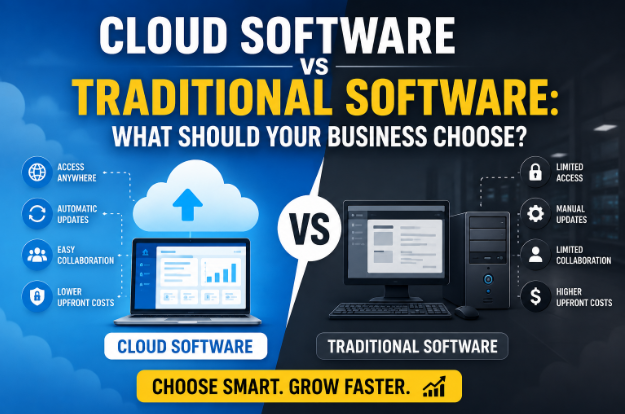
Step 4: Choose Cloud-Based or Traditional Software
One of the biggest decisions is whether to use cloud software or traditional on-premises software.
Cloud Software
Benefits:
- Access from anywhere
- Automatic updates
- Easy collaboration
- Lower upfront costs
- Minimal IT maintenance
Best for:
- Small businesses
- Startups
- Remote teams
- Growing companies
Traditional Software
Benefits:
- Greater control
- Offline access
- Extensive customization
- Local data storage
Best for:
- Organizations with strict compliance requirements
- Businesses using specialized legacy systems
- Companies with robust in-house IT teams
Step 5: Look for Essential Features
Avoid choosing software based solely on marketing claims.
Instead, focus on features your business genuinely needs.
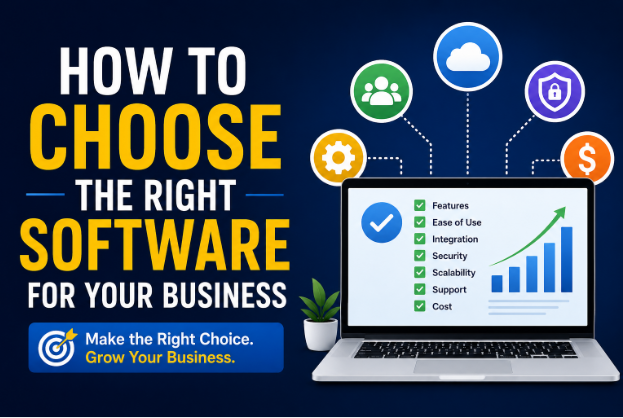
Important features include:
Ease of Use
Employees should be able to learn the software quickly.
Automation
Look for automation features such as:
- Invoice generation
- Email scheduling
- Workflow automation
- Report generation
Reporting and Analytics
Good software provides insights that help improve decision-making.
Mobile Access
Modern businesses often require access from smartphones and tablets.
Security
Look for:
- Data encryption
- Multi-factor authentication
- User permissions
- Regular backups
Integration
Your software should work seamlessly with existing tools like:
- Accounting systems
- CRM platforms
- Payment gateways
- Email services
- Cloud storage
Step 6: Consider Scalability
Your business will likely grow over time.
Choose software that can grow with you.
Scalable software should allow you to:
- Add users
- Increase storage
- Unlock advanced features
- Expand functionality
Switching software every year can be expensive and disruptive.
Step 7: Research the Vendor
The software provider matters just as much as the product.
Before purchasing, evaluate:
- Company reputation
- Years in business
- Customer reviews
- Update frequency
- Customer support quality
- Security practices
- Product roadmap
A trustworthy vendor is more likely to provide reliable updates and long-term support.
Step 8: Test Before Buying
Most software providers offer:
- Free trials
- Demo accounts
- Live demonstrations
Use these opportunities to evaluate:
- Ease of navigation
- Performance
- Features
- Integration capabilities
- User experience
Encourage employees who will use the software daily to test it and provide feedback.
Step 9: Evaluate Customer Support
Even the best software can occasionally present challenges.
Choose a provider that offers reliable support through:
- Live chat
- Phone
- Help centers
- Video tutorials
- Community forums
Fast and knowledgeable support can minimize downtime and frustration.
Step 10: Prioritize Security
Businesses handle valuable information, including customer records, financial data, and confidential documents.
Ensure your software includes:
- Encryption
- Secure login options
- Multi-factor authentication
- Automatic backups
- Compliance with relevant regulations
- Role-based access controls
Strong security protects both your business and your customers.
Common Types of Business Software
Depending on your business, you may need different categories of software.
Accounting Software
Helps manage:
- Invoices
- Expenses
- Taxes
- Financial reporting
CRM Software
Used for:
- Customer management
- Lead tracking
- Sales pipelines
- Customer communication
Project Management Software
Helps organize:
- Tasks
- Deadlines
- Team collaboration
- Progress tracking
Communication Software
Supports:
- Team messaging
- Video meetings
- File sharing
Marketing Software
Used for:
- Email campaigns
- Social media scheduling
- Analytics
- Marketing automation
Inventory Management Software
Ideal for:
- Retail
- Manufacturing
- E-commerce
- Warehousing
HR Software
Manages:
- Payroll
- Attendance
- Recruitment
- Employee records
Common Mistakes to Avoid
Many businesses make avoidable mistakes when selecting software.
Don't:
- Buy software with features you'll never use
- Ignore employee feedback
- Skip the free trial
- Focus only on price
- Forget about future growth
- Overlook integration capabilities
- Ignore customer support quality
- Underestimate training needs
Taking time to evaluate your options carefully can save significant costs later.
Signs You've Chosen the Right Software
You'll know you've made a good choice if the software:
- Solves your main business challenges
- Is easy for employees to use
- Improves productivity
- Saves time
- Fits your budget
- Integrates with your existing tools
- Provides reliable customer support
- Can scale with your business
The right software should become a valuable part of your daily operations rather than another problem to manage.
Future Trends in Business Software (2026)
Technology continues to reshape the software landscape.
Key trends include:
AI-Powered Features
Artificial intelligence is helping businesses automate tasks, analyze data, and improve customer experiences.
Greater Automation
Businesses are increasingly using software to reduce repetitive manual work.
Industry-Specific Solutions
More vendors are developing software tailored to sectors such as healthcare, legal services, retail, manufacturing, and education.
Enhanced Cybersecurity
Advanced security features are becoming standard as businesses face growing cyber threats.
All-in-One Platforms
Many companies are replacing multiple standalone tools with integrated platforms that combine CRM, accounting, collaboration, marketing, and analytics.
Frequently Asked Questions (FAQ)
What is the most important factor when choosing business software?
The most important factor is whether the software solves your business's specific needs. Features, pricing, and popularity are secondary if the solution doesn't address your core challenges.
Should small businesses choose cloud software?
For many small businesses, cloud software offers flexibility, automatic updates, easier collaboration, and lower upfront costs. However, the best choice depends on your operational and compliance requirements.
Is expensive software always better?
No. The best software is the one that provides the features you need, fits your budget, and delivers measurable value.
How many software tools should a business use?
Use only the tools necessary to support your workflows. Too many disconnected applications can increase complexity and reduce efficiency.
How often should software be reviewed?
Review your software stack annually—or sooner if your business grows significantly, your needs change, or new solutions provide clear advantages.
Final Thoughts
Choosing the right software is one of the smartest investments a business can make. Rather than chasing the newest or most popular platform, focus on software that aligns with your goals, budget, workflows, and future growth plans.
Take time to understand your requirements, compare solutions carefully, test products before purchasing, and involve the people who will use the software every day. A thoughtful decision today can improve productivity, reduce costs, and position your business for long-term success in an increasingly digital world.

developeradmin
GearInspector contributor. Passionate about helping you make smarter buys.